使用 Github Actions 实现 Steam 每天游戏时长记录

2024-10-09 update
补充离线游戏时长

2025-06-19 update
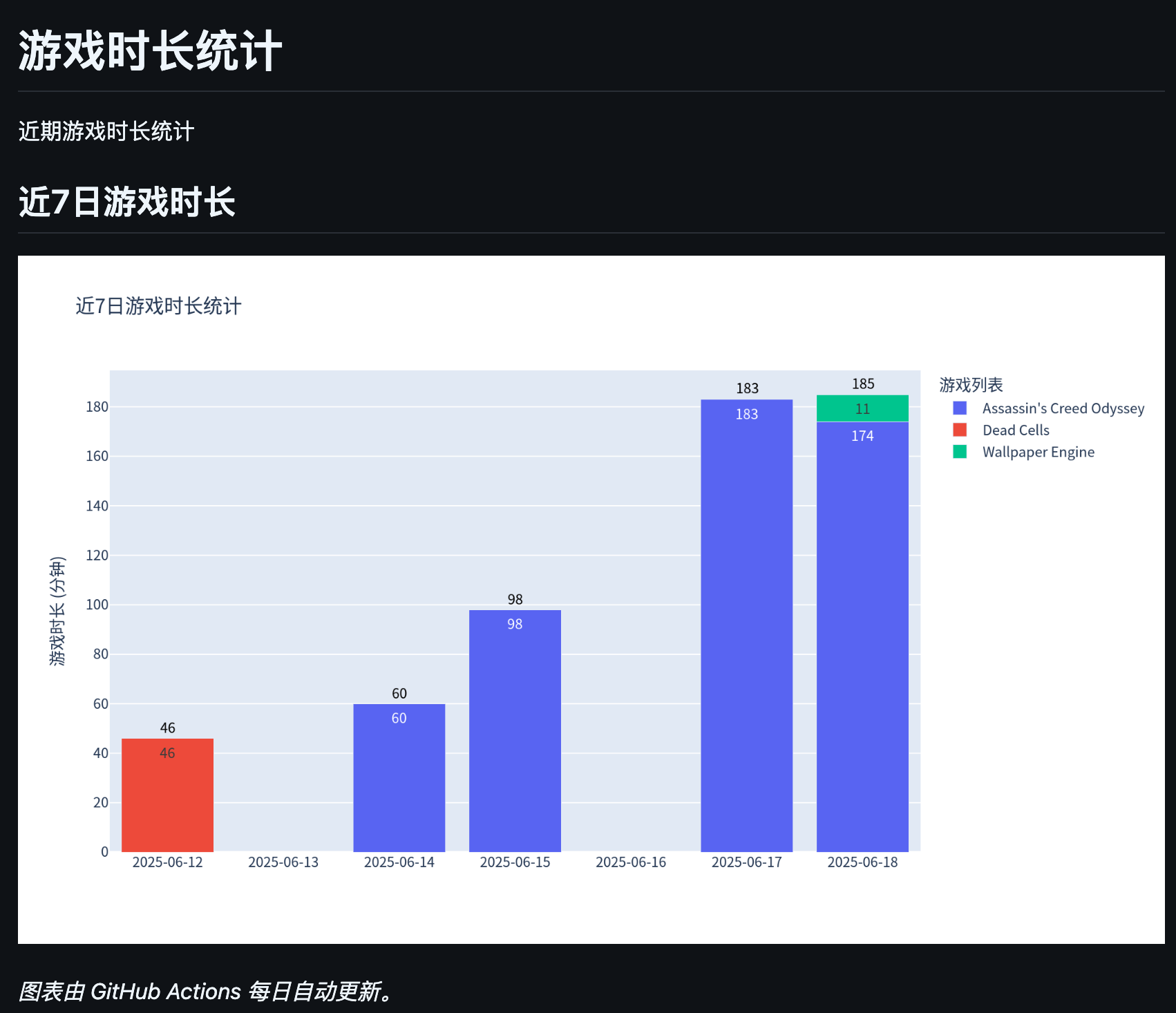
新增图表绘制

2025-12-16 update
优化逻辑,避免家庭库分享游戏游玩间隔超过 2 周导致时间错误的问题

2026-01-16 update
优化数据存储方式:CSV 改为 DuckDB,避免数据持续线性增长

2026-01-19 update
逻辑及代码实现调整较多,使用 AI 更新文档,暂未校对,仅作参考

todo:

  • 使用本地数据库代替 csv,避免数据持续线性增长
  • 优化 action 脚本,避免一次任务多次提交

背景说明

终于还是购买了 Steam Deck,在金钱的督促下最近电子阳痿缓解了很多,每天也多多少少会玩一会儿游戏。然后在折腾 Steam Deck 的过程中发现有个插件能够记录 Steam Deck 上的游戏时长,因此启发了我:既然我大多数时候游戏都是 Steam 在线游玩的,那是否能够通过 Steam 本身的一些 API 来实现记录每天的游戏时长呢?然后将每天的信息存下来,就能通过简单的减法来计算出每日各个游戏的时长了。

具体实现

Steam API 寻找

Steam 的 API 其实比较难找,因为官方的、成体系的、面向普通开发者 API 文档找起来很困难也不够新,看起来最正式、有良好维护的其实是面向一些游戏相关开发工作的 Steamworks API 文档:Steamworks API 概览
面向普通开发者的 API 文档:Steam Web API 文档Steam Web API,看上去就是一副缺少维护的样子,接口也都还是 http 的,虽然确实能调通。
最后还是找到了一个第三方提供的 API 文档:Steam Web API Documentation(GitHub 地址:SteamWebAPIDocumentation),看说明来源是通过 Steam 官方提供的 API 来获取所有支持的 API。

This is a static page that is automatically generated from GetSupportedAPIList using public and publisher keys. Additionally service methods are parsed from Steam client’s protobuf files.

但是实际测下来,即使是 Steam 官方接口返回的接口调用信息也是不准确的,如:GetOwnedGames 接口显示可以通过 appids*filter 来筛选需要查询的游戏,但是实际不生效,然后看到 Steam Web API 里又写到:

appids_filter
You can optionally filter the list to a set of appids. Note that these cannot be passed as a URL parameter, instead you must use the JSON format described in Steam_Web_API#Calling_Service_interfaces. The expected input is an array of integers (in JSON: “appids_filter: [ 440, 500, 550 ]” )

Calling Service interfaces
There is a new style of WebAPI which we refer to as “Services”. They function in many ways like the WebAPIs you are used to, the main difference being that all service APIs will accept their arguments as a single JSON blob in addition to taking them as GET or POST parameters. To pass in data as JSON, invoke the webapi with a parameter set like:
?key=XXXXXXXXXXXXXXXXXXXXXXXXXXXXXXXX&format=json&input_json={steamid: 76561197972495328}
Note that the JSON will need to be URL-encoded. The “key” and “format” fields should still be passed as separate parameters, as before. POST requests are supported as well.
You can identify if a WebAPI is a “Service” by the name of the interface; if it ends in “Service” like “IPlayerService”, then it supports this additional method of passing parameter data. Some Service methods have parameters that are more complex structures and require this different input format.

但是实际上都是在扯淡……按照文档说明的规则去写同样调不通。
查下来有个已经归档的项目里的说法是,参考 TF2 wiki 内的说法,需要使用以下格式:

appids_filter (Optional) (uint32)
Restricts results to the appids passed here. This is an array and should be passed like appids_filter[0]=440&appids_filter[1]=570

经过验证以上方式调用是有效的。
同时,文档里说可以使用 language 参数来修改返回的 appinfo 的语言,这个实测下来也无效——或者这个参数非常偏门,不是 zh-CN、Chinese 之类正常逻辑能想到的。好在也不太有这个需求&有中文信息的游戏也不多。

游戏时长获取方案

一开始打算使用 GetRecentlyPlayedGames 直接获取两周内各游戏的游戏时长然后通过每日定时执行脚本计算来获取每日的具体时长信息。但实际尝试下来发现“两周内时长”是一个滑窗动值,要根据这个计算出每日的时长信息是不足的,比如:游戏 A 昨天的两周内游戏时长是 14 小时,今天的两周内游戏时长是 15 小时,这只能够计算出游戏 A 今天的游戏时长比两周前的那天多 1 小时,并不能获取具体当天游戏时长。也许通过某些数学方式能够获取,但是总归太过麻烦。
选择使用其他接口,最终决定使用 GetOwnedGames 接口来获取,该接口会返回所有拥有的游戏,并返回该游戏的历史总游戏时长,使用该接口每天记录一次数据,并与前一天的数据做差值计算,即可获取到当天的各游戏时长。
验证过程中发现该方案的问题:GetOwnedGames 如同字面意思,只能返回“Owned”的游戏,而 Steam 最近的新家庭共享功能可以让我玩到我没有购买但是家庭组内其他成员购买的游戏。在这种情况下,通过 GetOwnedGames 获取到的信息中是缺少这些游戏的。
最后思考下来的解决方案是仍然需要使用 GetRecentlyPlayedGames 来进行补充,该接口能够正常显示两周内玩过的家庭共享游戏信息,包括总游戏时长。因此,在使用 GetOwnedGames 获取数据后,再通过 GetRecentlyPlayedGames 获取数据并对其中缺失的游戏进行补充,即可有效获取到所有游戏时长信息。
随后的事情就比较简单了,用今天的数据和前一天的数据做差值计算,即可得到当天的各游戏时长;如果存在昨天不存在的游戏数据说明是今天第一次玩的,直接用现有的游戏总时长即可。

2025/05/27 update

由于 GetRecentlyPlayedGames 仅获取两周内游戏时长,因此若家庭组内游戏超过两周未游玩,下次游玩时则会错误将总时长作为当天游戏时长,该情况下处理逻辑暂未实现,需要手动校准。

2025/12/16 update
已优化

定时脚本执行及数据保存方案

一开始其实考虑过在自己买的云服务器上定时运行脚本,但是想了想后面云服务器到期大概率不太会续了,即使要续大概率也会购买另一家云厂商的,到时候进行程序&数据迁移会比较麻烦。
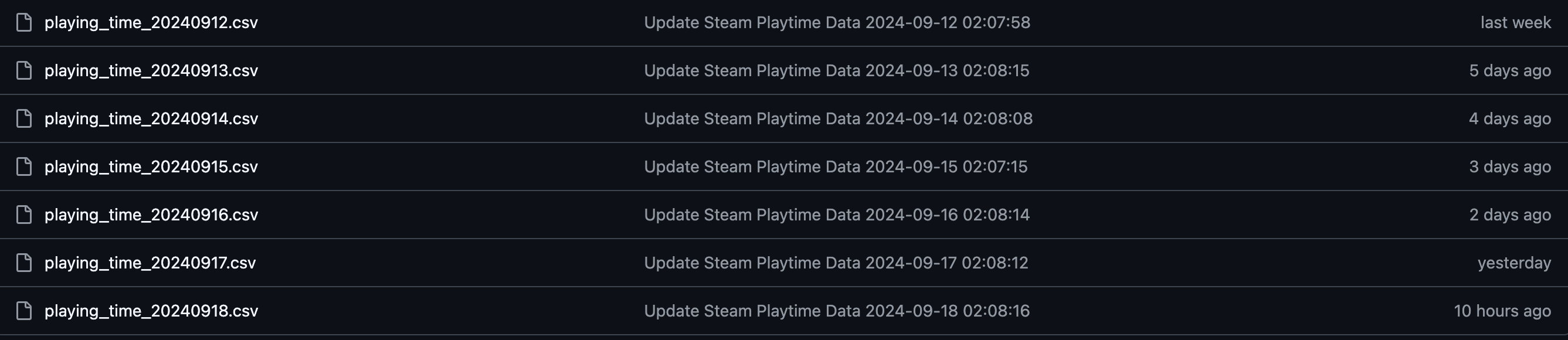
最后考虑了多种方案还是决定白嫖 GitHub 的资源,使用 GitHub Actions 来实现定时的脚本执行,并使用 DuckDB 嵌入式数据库保存数据到 GitHub 仓库。
大致方案如下:

  1. 新建私有仓库,将上述游戏时长获取脚本保存到该仓库中;
  2. 使用 DuckDB 作为数据存储方案,替代原先的 CSV 文件,避免数据文件持续线性增长;
  3. 新建一个 GitHub Action,配置定时执行,自动拉取该仓库并执行脚本,最后将数据库文件通过 commit 和 push 保存到该仓库中。

图表绘制

(20250619 update)
长期另外写一个 jupyter 脚本来拉数据画图表,今天计划还是写一个脚本每天执行,并将结果放到 README.md 中。

代码

游戏时长获取

以下为游戏时长获取脚本,使用 Python 实现。

  1
  2
  3
  4
  5
  6
  7
  8
  9
 10
 11
 12
 13
 14
 15
 16
 17
 18
 19
 20
 21
 22
 23
 24
 25
 26
 27
 28
 29
 30
 31
 32
 33
 34
 35
 36
 37
 38
 39
 40
 41
 42
 43
 44
 45
 46
 47
 48
 49
 50
 51
 52
 53
 54
 55
 56
 57
 58
 59
 60
 61
 62
 63
 64
 65
 66
 67
 68
 69
 70
 71
 72
 73
 74
 75
 76
 77
 78
 79
 80
 81
 82
 83
 84
 85
 86
 87
 88
 89
 90
 91
 92
 93
 94
 95
 96
 97
 98
 99
100
101
102
103
104
105
106
107
108
109
110
111
112
113
114
115
116
117
118
119
120
121
122
123
124
125
126
127
128
129
130
131
132
133
134
135
136
137
138
139
140
141
142
143
144
145
146
147
148
149
150
151
152
153
154
155
156
157
158
159
160
161
162
163
164
165
166
167
168
169
170
171
172
173
174
175
176
177
178
179
180
181
182
183
184
185
186
187
188
189
190
191
192
193
194
195
196
197
198
199
200
201
202
203
204
205
206
207
208
209
210
211
212
213
214
215
216
217
218
219
220
221
222
223
224
225
226
227
228
229
230
231
232
233
234
235
236
237
238
239
240
241
242
243
244
245
246
247
248
249
250
251
252
253
254
255
256
257
258
259
260
261
262
263
264
265
266
267
268
269
270
271
272
273
274
275
276
277
278
279
280
281
282
283
284
285
286
287
288
289
290
291
292
293
294
# script/get_playtime.py

import datetime
import os

import duckdb
import pandas as pd
import pytz
import requests
from requests.adapters import HTTPAdapter
from urllib3.util.retry import Retry

retry_strategy = Retry(
    total=3,
    backoff_factor=1,
    status_forcelist=[429, 500, 502, 503, 504],
    allowed_methods=["GET"],
)

adapter = HTTPAdapter(max_retries=retry_strategy)
session = requests.Session()
session.mount("http://", adapter)
session.mount("https://", adapter)


def get_steam_data():
    """
    Get the all game data & 2week playtime
    """

    all_url = "https://api.steampowered.com/IPlayerService/GetOwnedGames/v1"
    recently_url = (
        "https://api.steampowered.com/IPlayerService/GetRecentlyPlayedGames/v1"
    )

    # read key & steamid from environment
    key = os.environ.get("STEAM_KEY")
    steamid = os.environ.get("STEAM_ID")

    if key is None or steamid is None:
        raise ValueError("STEAM_KEY or STEAM_ID is not set")

    params = {
        "key": key,
        "steamid": steamid,
        "include_appinfo": True,
        "include_played_free_games": True,
        "include_free_sub": True,
    }

    all_response = session.get(all_url, params=params, timeout=10)
    all_res = all_response.json().get("response").get("games")
    all_steam_df = pd.DataFrame(all_res)

    now_time = datetime.datetime.now(pytz.timezone("Asia/Shanghai"))

    all_steam_df["creation_time"] = now_time

    # trans float to int
    all_steam_df["rtime_last_played"] = all_steam_df["rtime_last_played"].astype(int)
    all_steam_df["playtime_disconnected"] = all_steam_df[
        "playtime_disconnected"
    ].astype(int)
    if "playtime_2weeks" not in all_steam_df.columns:
        all_steam_df["playtime_2weeks"] = 0
    else:
        all_steam_df["playtime_2weeks"] = (
            all_steam_df["playtime_2weeks"].fillna(0).astype(int)
        )

    # Save to DuckDB
    con = duckdb.connect("./data/steam_data.duckdb")
    con.execute("""
        INSERT INTO steam_data
        SELECT * FROM all_steam_df
    """)
    con.close()

    recently_response = session.get(recently_url, params=params, timeout=10)
    recently_res = recently_response.json().get("response").get("games")
    steam_df = pd.DataFrame(recently_res)
    steam_df["created_time"] = now_time

    # Save to DuckDB
    con = duckdb.connect("./data/steam_data.duckdb")
    con.execute("""
        INSERT INTO playtime_2week_data
        SELECT * FROM steam_df
    """)
    con.close()


def merge_steam_data():
    """
    merge the all game data & 2week playtime data,
    because the all game data without the game from family share
    """

    # Read from DuckDB
    con = duckdb.connect("./data/steam_data.duckdb")
    all_game_info = con.execute(
        """
        SELECT * FROM steam_data
        WHERE DATE(creation_time AT TIME ZONE 'Asia/Shanghai') = ?
    """,
        [datetime.datetime.now(pytz.timezone("Asia/Shanghai")).date()],
    ).df()

    recently_game_info = con.execute(
        """
        SELECT * FROM playtime_2week_data
        WHERE DATE(created_time AT TIME ZONE 'Asia/Shanghai') = ?
    """,
        [datetime.datetime.now(pytz.timezone("Asia/Shanghai")).date()],
    ).df()
    con.close()

    # get the data in recently_game_info but not in all game data
    not_in_all_game_info = recently_game_info[
        ~recently_game_info["appid"].isin(all_game_info["appid"])
    ]
    # fill the data of all_game_info by recently_game_info
    now_time = datetime.datetime.now(pytz.timezone("Asia/Shanghai"))
    for index, row in not_in_all_game_info.iterrows():
        new_row = {
            "appid": row["appid"],
            "name": row["name"],
            "playtime_forever": row["playtime_forever"],
            "playtime_windows_forever": row["playtime_windows_forever"],
            "playtime_mac_forever": row["playtime_mac_forever"],
            "playtime_linux_forever": row["playtime_linux_forever"],
            "playtime_deck_forever": row["playtime_deck_forever"],
            "playtime_2weeks": row["playtime_2weeks"],
            "creation_time": now_time,
        }
        all_game_info = pd.concat(
            [all_game_info, pd.DataFrame([new_row])], ignore_index=True
        )
    all_game_info["rtime_last_played"] = (
        all_game_info["rtime_last_played"].fillna(0).astype(int)
    )
    all_game_info["playtime_disconnected"] = (
        all_game_info["playtime_disconnected"].fillna(0).astype(int)
    )

    # Update data in DuckDB
    con = duckdb.connect("./data/steam_data.duckdb")
    con.execute(
        """
        DELETE FROM steam_data
        WHERE DATE(creation_time AT TIME ZONE 'Asia/Shanghai') = ?
    """,
        [datetime.datetime.now(pytz.timezone("Asia/Shanghai")).date()],
    )
    con.execute("""
        INSERT INTO steam_data
        SELECT * FROM all_game_info
    """)
    con.close()


def find_last_record(appid):
    """
    Find the most recent historical record for a given appid before today

    Args:
        appid: The game's appid

    Returns:
        A tuple of (playtime_forever, playtime_disconnected) if found, otherwise (None, None)
    """
    today_date = datetime.datetime.now(pytz.timezone("Asia/Shanghai")).date()

    # Query from DuckDB
    con = duckdb.connect("./data/steam_data.duckdb")
    result = con.execute(
        """
        SELECT playtime_forever, playtime_disconnected
        FROM steam_data
        WHERE appid = ? AND DATE(creation_time AT TIME ZONE 'Asia/Shanghai') < ?
        ORDER BY creation_time DESC
        LIMIT 1
    """,
        [appid, today_date],
    ).fetchone()
    con.close()

    if result is None:
        return None, None

    return (result[0], result[1])


def get_playing_time():
    """
    Get the playing time of today
    """

    # today_date (UTC+8)
    today = datetime.datetime.now(pytz.timezone("Asia/Shanghai")).date()
    yesterday = today - datetime.timedelta(1)

    # Read from DuckDB
    con = duckdb.connect("./data/steam_data.duckdb")
    today_game_info = con.execute(
        """
        SELECT * FROM steam_data
        WHERE DATE(creation_time AT TIME ZONE 'Asia/Shanghai') = ?
    """,
        [today],
    ).df()

    yesterday_game_info = con.execute(
        """
        SELECT * FROM steam_data
        WHERE DATE(creation_time AT TIME ZONE 'Asia/Shanghai') = ?
    """,
        [yesterday],
    ).df()
    con.close()

    # Calculate the today playing time
    merge_game_info = pd.merge(
        today_game_info,
        yesterday_game_info,
        on="appid",
        how="left",
        suffixes=("_new", "_old"),
    )

    def calculate_playing_time(row):
        """Calculate playing time for a single game record"""

        # Case 1: Has yesterday's record - calculate normal increment
        if not pd.isna(row["playtime_forever_old"]):
            return int(
                row["playtime_forever_new"]
                + row["playtime_disconnected_new"]
                - row["playtime_forever_old"]
                - row["playtime_disconnected_old"]
            )

        # Case 2: No yesterday's record - find the most recent historical record
        last_forever, last_disconnected = find_last_record(row["appid"])

        if last_forever is not None:
            # Found historical record - calculate increment from last record
            return int(
                row["playtime_forever_new"]
                + row["playtime_disconnected_new"]
                - last_forever
                - last_disconnected
            )

        # Case 3: No historical record found - this is a new game
        return int(row["playtime_forever_new"] + row["playtime_disconnected_new"])

    merge_game_info["playing_time"] = merge_game_info.apply(
        calculate_playing_time, axis=1
    )
    # keep only one name field: remove name_old, rename name_new to name
    merge_game_info.drop("name_old", axis=1, inplace=True)
    merge_game_info.rename(columns={"name_new": "name"}, inplace=True)

    # filter the data with playing_time > 0
    merge_game_info = merge_game_info[merge_game_info["playing_time"] > 0]
    merge_game_info = merge_game_info[["appid", "name", "playing_time"]]
    time = datetime.datetime.now(pytz.timezone("Asia/Shanghai"))

    # set game_name next to appid
    merge_game_info = merge_game_info[["appid", "name", "playing_time"]]
    # playtime_date is yesterday
    merge_game_info["playtime_date"] = (
        datetime.datetime.now(pytz.timezone("Asia/Shanghai")) - datetime.timedelta(1)
    ).date()
    merge_game_info["creation_time"] = time

    # Save to DuckDB
    con = duckdb.connect("./data/steam_data.duckdb")
    con.execute("""
        INSERT INTO playing_time_data
        SELECT * FROM merge_game_info
        ON CONFLICT (appid, playtime_date) DO UPDATE SET
            name = EXCLUDED.name,
            playing_time = EXCLUDED.playing_time,
            creation_time = EXCLUDED.creation_time
    """)
    con.close()


if __name__ == "__main__":
    get_steam_data()
    merge_steam_data()
    get_playing_time()

保存图表

(20250619 update)

  1
  2
  3
  4
  5
  6
  7
  8
  9
 10
 11
 12
 13
 14
 15
 16
 17
 18
 19
 20
 21
 22
 23
 24
 25
 26
 27
 28
 29
 30
 31
 32
 33
 34
 35
 36
 37
 38
 39
 40
 41
 42
 43
 44
 45
 46
 47
 48
 49
 50
 51
 52
 53
 54
 55
 56
 57
 58
 59
 60
 61
 62
 63
 64
 65
 66
 67
 68
 69
 70
 71
 72
 73
 74
 75
 76
 77
 78
 79
 80
 81
 82
 83
 84
 85
 86
 87
 88
 89
 90
 91
 92
 93
 94
 95
 96
 97
 98
 99
100
101
102
103
104
105
106
107
108
109
110
111
112
113
114
115
116
117
118
119
120
121
122
123
124
# script/plot_generator.py

import os
import pandas as pd
import plotly.express as px
from datetime import datetime, timedelta
import pytz
import duckdb

# --- 配置 ---
CHART_OUTPUT_PATH_PNG = "images/playing_time_chart.png"
CHART_OUTPUT_PATH_HTML = "docs/index.html"  # 用于 GitHub Pages
DAYS_TO_SHOW = 7  # 定义要展示的天数

# --- 1. 创建一个完整的日期范围 ---
today = datetime.now(pytz.timezone("Asia/Shanghai")).date()
date_range = [today - timedelta(days=i + 1) for i in range(DAYS_TO_SHOW)] # 凌晨执行所以天数-1
date_range.reverse()  # 从小到大排序
# 将日期转换为字符串格式 YYYY-MM-DD,方便后续处理
date_range_str = [d.strftime("%Y-%m-%d") for d in date_range]

# --- 2. 从DuckDB加载数据 ---
DB_PATH = "./data/steam_data.duckdb"

if not os.path.exists(DB_PATH):
    print("Database file not found. Exiting.")
    exit()

# 连接数据库并查询最近N天的数据
con = duckdb.connect(DB_PATH)
df = con.execute("""
    SELECT appid, name, playing_time, playtime_date
    FROM playing_time_data
    WHERE playtime_date >= ?
    ORDER BY playtime_date
""", [date_range[0]]).df()
con.close()

if df.empty:
    print("No data found in database. Exiting.")
    exit()

# 确保 'playtime_date' 是字符串格式
df["playtime_date"] = pd.to_datetime(df["playtime_date"]).dt.strftime("%Y-%m-%d")

# 筛选出在日期范围内的数据
df_recent = df[df["playtime_date"].isin(date_range_str)].copy()

# --- 3. 数据透视与填充 ---
# 使用 pivot_table 将数据重塑,游戏名为列,日期为索引,时长为值
pivot_df = df_recent.pivot_table(
    index="playtime_date", columns="name", values="playing_time", aggfunc="sum"
).fillna(0)

# 使用 reindex 确保所有日期都在 DataFrame 中,缺失的用 0 填充
pivot_df = pivot_df.reindex(date_range_str, fill_value=0)

# 计算每日总时长
daily_totals = pivot_df.sum(axis=1)

# 将数据从宽格式转回长格式,以便 Plotly Express 使用
plot_df = pivot_df.reset_index().melt(
    id_vars="playtime_date", var_name="name", value_name="playing_time"
)

# --- 4. 绘制堆积柱状图 ---
fig = px.bar(
    plot_df,
    x="playtime_date",
    y="playing_time",
    color="name",
    title="近7日游戏时长统计",
    labels={"playing_time": "游戏时长 (分钟)", "name": "游戏名称"},
    text="playing_time",
)

# --- 5. 更新图表布局和样式 ---
fig.update_layout(
    font_family="Noto Sans CJK SC", # 指定字体,避免中文显示问题
    barmode="stack",
    xaxis_title=None,  # 移除X轴标题
    yaxis_title="游戏时长 (分钟)",
    # 设置X轴为分类轴,并明确指定顺序和格式
    xaxis=dict(
        type="category",
        categoryorder="array",
        categoryarray=date_range_str,  # 保证日期从左到右依次增大
        tickformat="%Y-%m-%d",
    ),
    legend_title_text="游戏列表",
)

fig.update_traces(
    textposition="inside",
    textfont_size=12,
    texttemplate="%{text:.0f}",  # 将文本格式化为不带小数的整数
)

# --- 6. 添加每日总时长标注 ---
annotations = []
for date_val, total_minutes in daily_totals.items():
    # 只有在总时长大于0时才添加标注
    if total_minutes > 0:
        annotations.append(
            dict(
                x=date_val,
                y=total_minutes,
                text=str(int(total_minutes)),  # 格式为纯数字
                showarrow=False,
                xanchor="center",
                yanchor="bottom",
                font=dict(size=12, color="black"),
            )
        )

fig.update_layout(annotations=annotations)

# --- 7. 保存图表 ---
# 确保输出目录存在
os.makedirs("images", exist_ok=True)

# 保存为静态 PNG 图片
fig.write_image(CHART_OUTPUT_PATH_PNG, width=1000, height=600, scale=2)
print(f"Static chart saved to {CHART_OUTPUT_PATH_PNG}")

数据库初始化

(20260116 update)
使用 DuckDB 作为数据存储方案后,需要先初始化数据库结构。

 1
 2
 3
 4
 5
 6
 7
 8
 9
10
11
12
13
14
15
16
17
18
19
20
21
22
23
24
25
26
27
28
29
30
31
32
33
34
35
36
37
38
39
40
41
42
43
44
45
46
47
48
49
50
51
52
53
54
55
56
57
58
59
60
61
62
63
64
65
66
67
68
69
70
71
72
73
74
75
76
77
78
79
80
81
82
83
84
85
86
87
88
# script/db_init.py

import duckdb
import os


def init_database(db_path="./data/steam_data.duckdb"):
    """Initialize DuckDB database with required tables"""

    # Ensure data directory exists
    os.makedirs(os.path.dirname(db_path), exist_ok=True)

    # Connect to database (creates if not exists)
    con = duckdb.connect(db_path)

    # Create steam_data table - stores all game information
    con.execute("""
CREATE TABLE IF NOT EXISTS steam_data (
    appid INTEGER NOT NULL,
    name VARCHAR,
    img_icon_url VARCHAR,
    content_descriptorids VARCHAR,
    playtime_forever INTEGER CHECK (playtime_forever >= 0),
    playtime_windows_forever INTEGER CHECK (playtime_windows_forever >= 0),
    playtime_mac_forever INTEGER CHECK (playtime_mac_forever >= 0),
    playtime_linux_forever INTEGER CHECK (playtime_linux_forever >= 0),
    playtime_deck_forever INTEGER CHECK (playtime_deck_forever >= 0),
    playtime_disconnected INTEGER CHECK (playtime_disconnected >= 0),
    rtime_last_played BIGINT,
    playtime_2weeks INTEGER CHECK (playtime_2weeks >= 0),
    has_community_visible_stats BOOLEAN,
    has_leaderboards BOOLEAN,
    creation_time TIMESTAMPTZ,
    PRIMARY KEY (appid, creation_time)
)
    """)

    # Create playtime_2week_data table - stores recent 2-week playtime
    con.execute("""
CREATE TABLE IF NOT EXISTS playtime_2week_data (
    appid INTEGER NOT NULL,
    name VARCHAR,
    img_icon_url VARCHAR,
    playtime_2weeks INTEGER CHECK (playtime_2weeks >= 0),
    playtime_forever INTEGER CHECK (playtime_forever >= 0),
    playtime_windows_forever INTEGER CHECK (playtime_windows_forever >= 0),
    playtime_mac_forever INTEGER CHECK (playtime_mac_forever >= 0),
    playtime_linux_forever INTEGER CHECK (playtime_linux_forever >= 0),
    playtime_deck_forever INTEGER CHECK (playtime_deck_forever >= 0),
    created_time TIMESTAMPTZ,
    PRIMARY KEY (appid, created_time)
)
    """)

    # Create playing_time_data table - stores daily playtime increments
    con.execute("""
CREATE TABLE IF NOT EXISTS playing_time_data (
    appid INTEGER NOT NULL,
    name VARCHAR,
    playing_time INTEGER CHECK (playing_time >= 0),
    playtime_date DATE,
    creation_time TIMESTAMPTZ,
    PRIMARY KEY (appid, playtime_date)
)
    """)

    # Create indexes for better query performance
    con.execute("""
CREATE INDEX IF NOT EXISTS idx_steam_creation_time ON steam_data(creation_time);
CREATE INDEX IF NOT EXISTS idx_steam_appid_creation ON steam_data(appid, creation_time);
    """)

    con.execute("""
CREATE INDEX IF NOT EXISTS idx_playtime_date ON playing_time_data(playtime_date);
CREATE INDEX IF NOT EXISTS idx_appid_creation_time ON playing_time_data(appid, creation_time);
    """)

    con.execute("""
CREATE INDEX IF NOT EXISTS idx_2week_appid_created ON playtime_2week_data(appid, created_time);
    """)

    con.close()
    print(f"Database initialized successfully at {db_path}")
    return db_path


if __name__ == "__main__":
    init_database()

GitHub Actions yaml 配置

以下为 GitHub Actions 的 yaml 配置文件。
基本都是 GitHub Actions 的八股文,可以参考官方文档或者网络上其他文档。

(20260116 update)
优化了工作流,将数据获取和图表生成合并到一个 job 中,减少不必要的 commit 次数。
同时支持多分支并行执行,便于新功能开发后对比。

 1
 2
 3
 4
 5
 6
 7
 8
 9
10
11
12
13
14
15
16
17
18
19
20
21
22
23
24
25
26
27
28
29
30
31
32
33
34
35
36
37
38
39
40
41
42
43
44
45
46
47
48
49
50
51
52
53
54
55
56
57
58
59
60
61
62
63
64
65
66
67
68
69
70
71
72
73
74
75
76
77
78
79
80
81
82
83
84
85
86
87
88
89
90
91
92
93
94
95
96
97
98
99
name: Get Steam Playtime Data and Generate Chart (All Branches)

on:
  schedule:
    # UTC 18:00 = 北京时间 02:00
    - cron: "0 18 * * *"
  workflow_dispatch:

permissions:
  contents: write # 允许 workflow push 代码

jobs:
  get-branches:
    name: Detect all branches
    runs-on: ubuntu-latest

    outputs:
      branches: ${{ steps.set-matrix.outputs.branches }}

    steps:
      - name: Checkout repository
        uses: actions/checkout@v4
        with:
          fetch-depth: 0

      - name: Generate branch matrix
        id: set-matrix
        run: |
          echo "Fetching all remote branches..."
          git fetch --all

          branches=$(git branch -r \
          | grep -v -- '->' \
          | sed 's|origin/||' \
          | sed 's/^[[:space:]]*//;s/[[:space:]]*$//' \
          | grep -vE '^(gh-pages|dependabot/)' )

          json=$(printf '%s\n' "$branches" \
          | jq -R -s -c 'split("\n") | map(select(length > 0))')

          echo "Detected branches: $json"
          echo "branches=$json" >> "$GITHUB_OUTPUT"

  run-on-all-branches:
    name: Run workflow on each branch
    needs: get-branches
    runs-on: ubuntu-latest

    strategy:
      fail-fast: false
      max-parallel: 3
      matrix:
        branch: ${{ fromJSON(needs.get-branches.outputs.branches) }}

    steps:
      - name: Checkout branch
        uses: actions/checkout@v4
        with:
          ref: ${{ matrix.branch }}
          fetch-depth: 0

      - name: Set up Python
        uses: actions/setup-python@v5
        with:
          python-version: "3.12"
          cache: "pip"
          cache-dependency-path: ./script/requirements.txt

      - name: Install dependencies
        run: pip install -r ./script/requirements.txt

      - name: Install Chinese fonts
        run: |
          sudo apt-get update
          sudo apt-get install -y fonts-noto-cjk

      - name: Get Steam playtime data
        env:
          STEAM_KEY: ${{ secrets.STEAM_KEY }}
          STEAM_ID: ${{ vars.STEAM_ID }}
        run: python ./script/get_playtime.py

      - name: Generate chart
        run: python ./script/plot_generator.py

      - name: Commit and push changes
        run: |
          git config user.email "action@github.com"
          git config user.name "GitHub Action"

          git add data/ images/

          if ! git diff --staged --quiet; then
            git commit -m "Update Steam playtime & chart (${{ matrix.branch }}) \
            `TZ='Asia/Shanghai' date +'%Y-%m-%d %H:%M:%S'`"
            git push origin "HEAD:${{ matrix.branch }}"
          else
            echo "No changes on branch ${{ matrix.branch }}"
          fi

最终效果

数据列表(outdated)

数据内容

图表展示

版权声明:本文为 CBC 原创,依据 CC BY-NC-SA 4.0 许可证进行授权,转载请附上出处链接及本声明。
最后更新于 2026/01/19 14:25:27